Basics of Multi-Frame Super-Resolution
TL;DR
- Goal. One sharper image from several low-resolution photos of the same scene.
- Why. Telescopes and phones use it to show detail finer than their camera’s pixels.
- Setup. To keep this post simple, the photos are simulated from one image, with shifts we choose.
- Pipeline. (1) shift the camera by less than a pixel between photos, so each one samples different points of the scene → (2) merge the photos into one image with more pixels than any of them.
- Result. From 256 photos, each 16 times smaller in both directions, a cat’s whiskers come back, though a single photo loses them.
Introduction
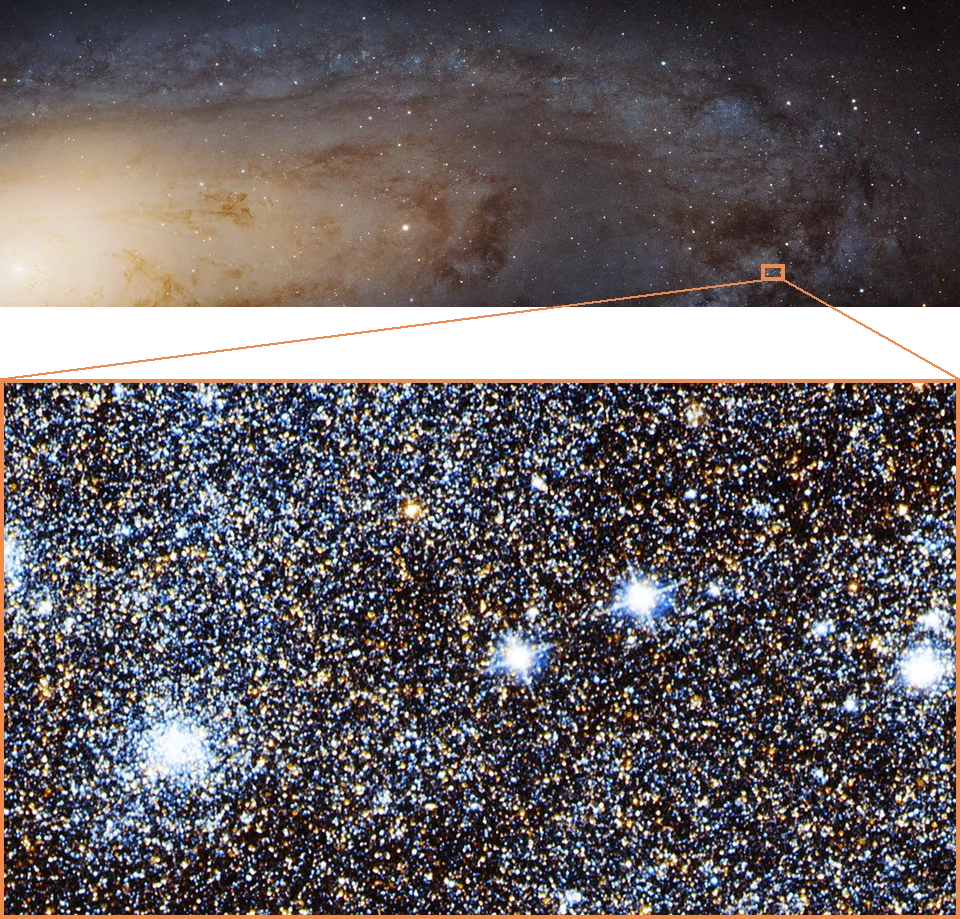
Astrophotography gives us hugely detailed images of stars, galaxies and planets, some of them with billions of pixels. Zoom into Hubble’s panorama of Andromeda in Figure 1, and what looks like a glow resolves into individual stars. The panorama has about 1.5 billion pixels, yet Hubble’s camera records only 16.8 megapixels in one exposure. So how is this even possible?
The size comes from stitching. NASA reports 7,398 exposures over 411 pointings, joined into one mosaic. Within each field, the telescope took several exposures and moved by fractions of a pixel between them (Dalcanton et al., 2012), so together they measure the sky at more points than any one of them. Combining such shifted exposures into one finer image is called multi-frame super-resolution, and phones do the same with the small shifts of a handheld burst (Wronski et al., 2019).
In this post, we look at the simplest case, where we already know the movements. Real systems also have to estimate the shifts and cope with the atmosphere, tracking errors and motion blur, which we leave out. Instead, we simulate the shifted photos from one high-resolution photo, moving it by amounts we choose.
The idea in one dimension
Take one row of a photo that crosses a cat’s whisker, and describe it by eight brightness values, a to h, as in Figure 2. The whisker is at d. A low-resolution camera with half as many pixels, a scale factor of \(s=2\), records only every second sample. Frame 1, the first low-resolution photo, records a, c, e and g, missing the whisker entirely. Move the camera by one sample, half a low-resolution pixel, and frame 2 records b, d, f and h.

Each frame has only four measurements, but together they have all eight. Since we know the shift, we know where each value belongs, and can alternate the two frames’ measurements to recover the row. This is interleaving. The samples one frame misses are measured in the other, so we don’t have to guess any of them from their neighbours.
In two dimensions
A photo works the same way, in both directions. The simulation has three parts:
- Scene. A close-up photo of a cat, the ground truth we want to recover.
- Capture. A simulated camera, \(s\) times coarser, in which each low-resolution pixel takes the top-left pixel of its \(s \times s\) block of the photo. Moving the camera one photo pixel right or down makes each of them take the neighbouring pixel instead, so the \(s \times s\) possible shifts give \(s^2\) low-resolution frames.
- Interleave. The super-resolution algorithm. It gets only the frames and their shifts, and puts every pixel back on the photo’s own grid, the fine grid.
Figure 3 does this with \(s=4\) and 16 frames.
In code, observe is the capture step, a strided slice of the shifted photo, and interleave is the super-resolution step.
import numpy as np
from PIL import Image


def observe(scene, s, dy, dx):
    """One low-resolution frame, offset by (dy, dx) on the fine grid."""
    # leave room for the largest shift, so that every frame has the same size
    h, w = (scene.shape[0] - s) // s * s, (scene.shape[1] - s) // s * s
    shifted = scene[dy:dy + h, dx:dx + w]
    return shifted[::s, ::s]


def interleave(frames, s, shape):
    """Put every frame back on the fine grid."""
    out = np.zeros(shape, dtype=np.float64)
    for (dy, dx), frame in frames.items():
        rows, cols = frame.shape[:2]
        out[dy:dy + rows * s:s, dx:dx + cols * s:s] = frame
    return out


scene = np.asarray(Image.open("img.jpeg"), dtype=np.float64)  # the cat photo
s = 4
frames = {(dy, dx): observe(scene, s, dy, dx) for dy in range(s) for dx in range(s)}
recovered = interleave(frames, s, scene.shape)
Real camera pixels
So far, each low-resolution pixel recorded a single point of the scene; we call these point pixels. A real camera pixel collects the light that falls on its whole area, so we model it as the average of its block, an averaging pixel. The whisker then never gets a measurement of its own, only averages that mix it with the fur around it. Does shifting the camera still tell us anything new?

To see what each step tells us, let d have brightness 1 and every other sample 0.
- Frame 1 records \((c+d)/2 = 1/2\) and zeros elsewhere. It knows which pair holds the whisker, but not whether it is c or d.
- Frame 2, shifted by one sample, records \((d+e)/2 = 1/2\) and a dark \((b+c)/2\), which rules out c. Together, the two frames place the whisker at d.
- Interleaved, the frames give an average of every neighbouring pair, a sliding average. The whisker is back in the right place, but spread over two values at half brightness, because interleaving doesn’t undo the averaging.
Switch Figure 3 to “averages its 4x4 block” and advance to all 16 frames. The grey gaps disappear as before, but the whiskers stay softer than in the original beside the grid, because each value is an average over a 4 × 4 block.
For averaging pixels, observe replaces the strided slice with the mean of each block. Using the same shifted, h, w and s as inside observe, the frame calculation becomes
blocks = shifted.reshape(h // s, s, w // s, s, -1)  # -1 keeps the colour channels
frame = blocks.mean(axis=(1, 3))
An average belongs at the middle of its block, so interleave places it about half a block further on, at s // 2. Inside interleave, we place that frame with
centre = s // 2
rows, cols = frame.shape[:2]
out[dy + centre:dy + centre + rows * s:s, dx + centre:dx + centre + cols * s:s] = frame
On the whole photo, with \(s=16\), one frame gives one average per 16 × 16 block, and all 256 shifts give averages of overlapping blocks, moving one fine-grid position at a time in both directions. Interleaving them gives the scene blurred by a 16 × 16 box, sampled on the fine grid; Lauer (1999) describes the same result for telescope images taken with small shifts. Figure 5 compares the two kinds of pixel on the same whiskers.
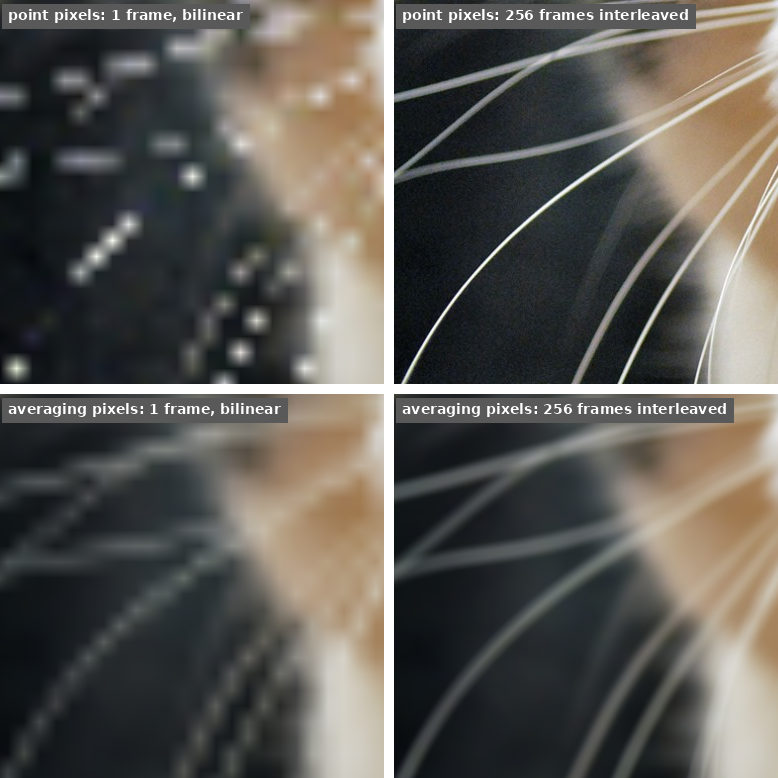
In the bottom row, both images are soft, but the single frame breaks the whiskers into dashes along its 16 × 16 blocks, because it only knows which block a whisker crosses. The interleaved frames draw them as continuous lines in the right place. Getting sharper whiskers takes a separate deblurring step, as in Farsiu et al. (2004).
Back to the telescope
The small shifts in astronomical imaging are called dithering, and they are often deliberate. The Andromeda survey planned its offsets in advance, then refined the alignment using stars (Dalcanton et al., 2012). Amateur astrophotographers can do the same with PHD2’s dithering, then register their frames on stars and combine them in Siril. Registration finds the shifts, which in our simulation we chose ourselves.
When the shifts land exactly on the fine grid, as ours do, the operation we called interleaving is known in astronomy as interlacing. Fruchter and Hook (2002) describe it and introduce Drizzle, which generalizes the placement to arbitrary shifts, rotations and geometric distortion. Like interleaving, Drizzle doesn’t undo the blur from the optics and the pixels.
So in Figure 1, stitching fields together gives the panorama its size, and the small shifts between the exposures of each field give more closely spaced measurements of its stars.
References
- J. J. Dalcanton et al., “The Panchromatic Hubble Andromeda Treasury,” The Astrophysical Journal Supplement Series, 200:18, 2012.
- A. S. Fruchter and R. N. Hook, “Drizzle: A Method for the Linear Reconstruction of Undersampled Images,” Publications of the Astronomical Society of the Pacific, 114:144, 2002.
- T. R. Lauer, “Combining Undersampled Dithered Images,” Publications of the Astronomical Society of the Pacific, 111:227, 1999.
- S. Farsiu, M. D. Robinson, M. Elad, and P. Milanfar, “Fast and Robust Multiframe Super Resolution,” IEEE Transactions on Image Processing, 13(10):1327–1344, 2004.
- B. Wronski, I. Garcia-Dorado, M. Ernst, D. Kelly, M. Krainin, C.-K. Liang, M. Levoy, and P. Milanfar, “Handheld Multi-Frame Super-Resolution,” SIGGRAPH, 2019.
Citation
Cited as:
Englert, Brunó B. (October 10, 2025). Basics of Multi-Frame Super-Resolution. englert.ai.
Or
@misc{englert2025multiframe,
  title        = {Basics of Multi-Frame Super-Resolution},
  author       = {Englert, Brunó B.},
  howpublished = {englert.ai},
  year         = {2025},
  month        = {October},
  url          = {https://englert.ai/posts/006_multiframe_super_resolution/englert_ai_6_multiframe_super_resolution.html}
}
Source code
multiframe_sr.py contains observe and interleave, with a pixel argument for pixels that average their block. Run it on any photo with python multiframe_sr.py photo.jpg to check both results; it needs NumPy and Pillow.